Thunderbolt Pro Dock
The Best Networking, Media, and Docking Solution for Pro Creatives

Faster Transfer
10Gb/s AVB
Ethernet Networking
Productive
10 Ports
Highest Speed Connections
Ingest Content Up To
10 Ports
CFexpress & SD Card Readers
Powerful
85W
Charging Power

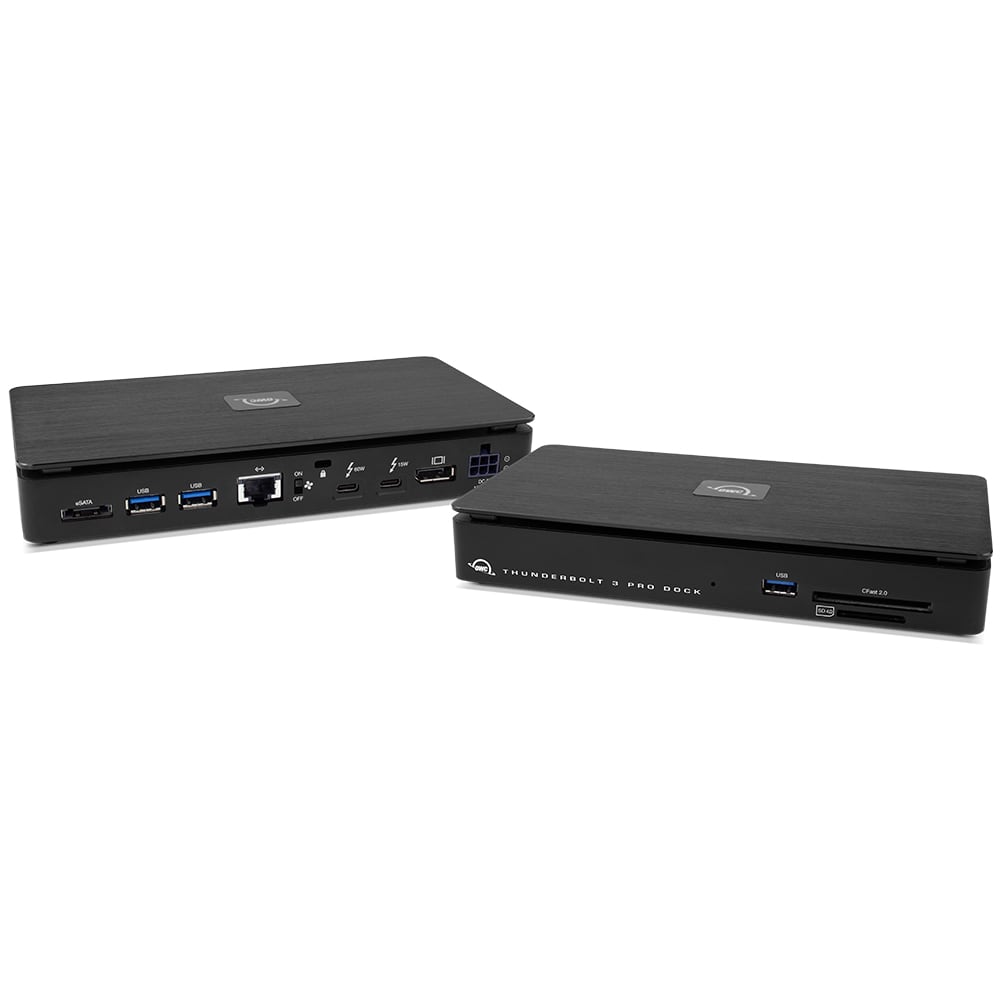

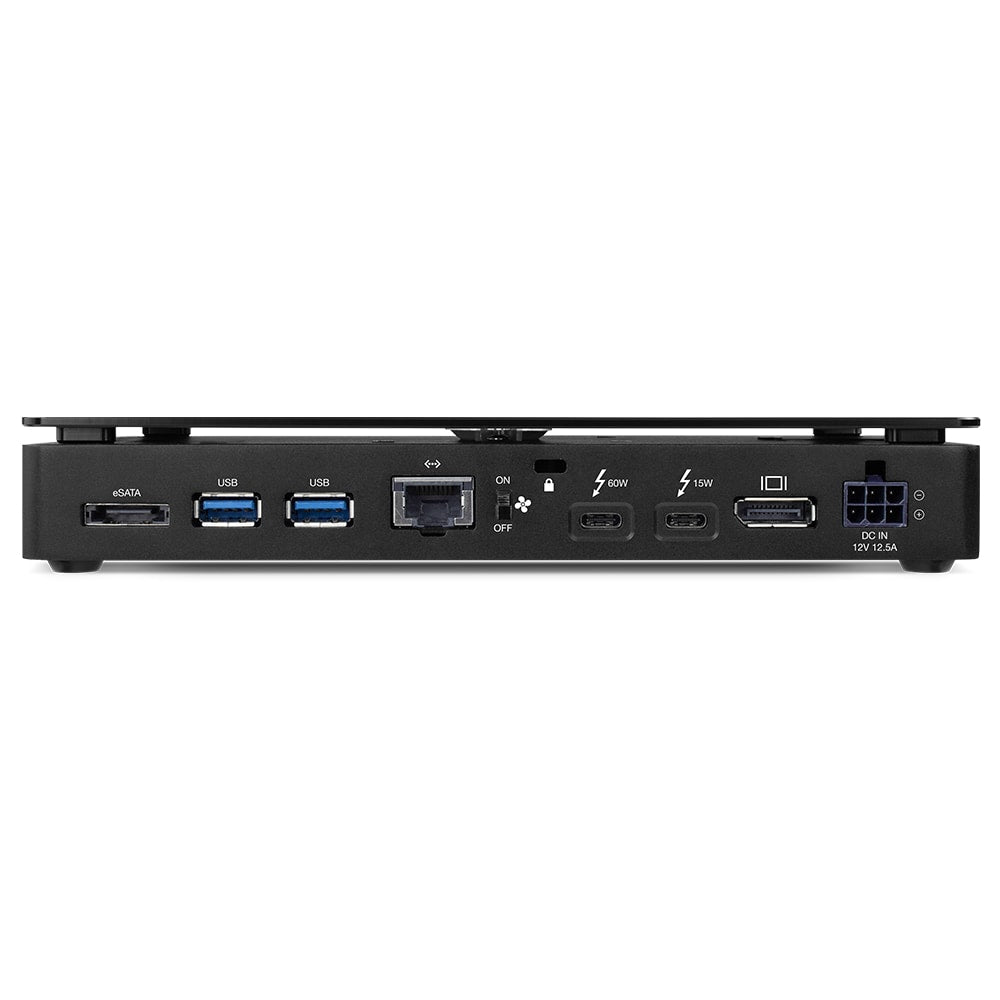

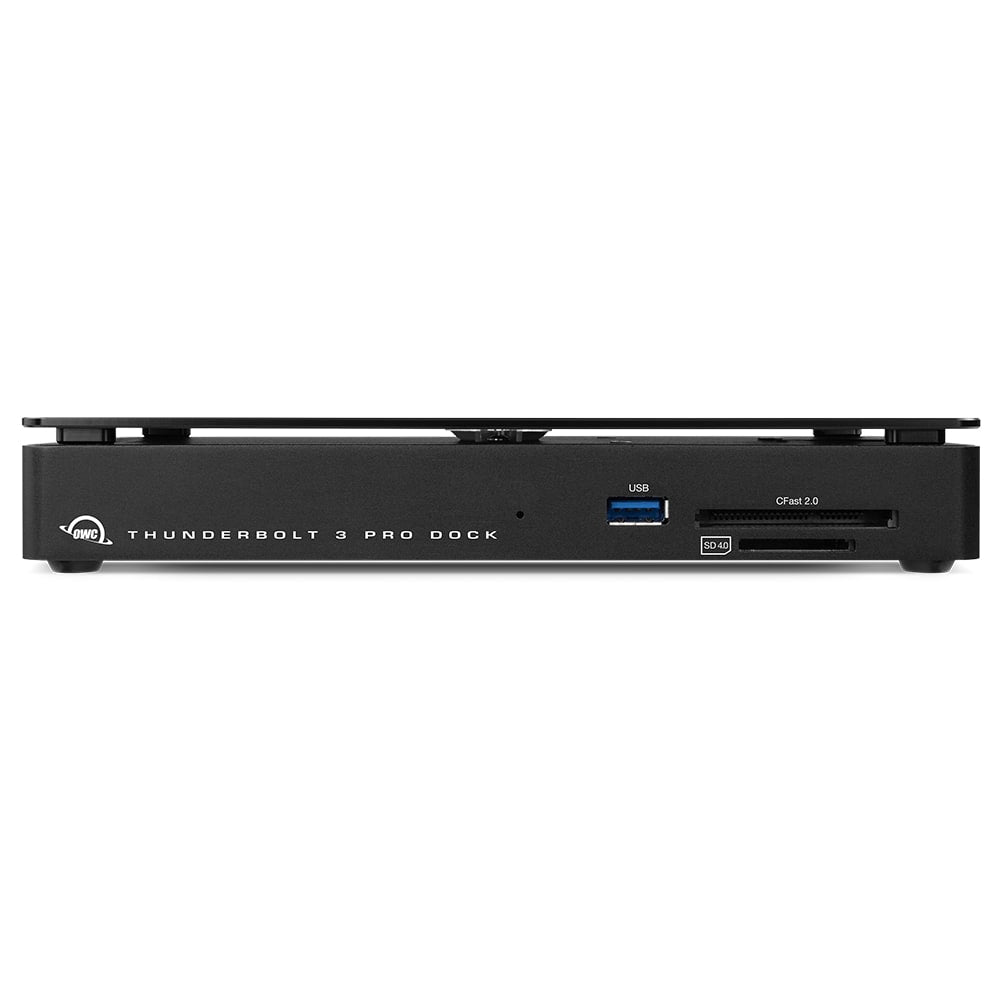


The Best Networking, Media, And Docking For Pro Creatives
- Fast & diverse: transfer files in a blink, daisy chain up to five Thunderbolt devices, use USB-C accessories, and add an HDMI display with two Thunderbolt (USB-C) ports
- Full throttle bandwidth: share and stream up to 90% faster with a 10Gb/s Ethernet port
- AVB ready: perfect for use in pro audio and video applications where synchronization of data streams is critical
- Ingest content: easily handle multiple video and photo card uploads at up to 1630MB/s with CFexpress and SD card readers
- Full speed connectivity: use your devices and accessories at their max speed with one USB-C and three USB Type A 10Gb/s ports
- Add more viewspace: connect two 4K displays or up to a single 8K display via Displayport 1.4
- Powerful: keep your notebook mobile use ready with 85W charging power
- Silent and secure: fanless cooling mode and locking power connection for on-set use
- Certified: Thunderbolt certified for Mac and Windows
- Worry-free: 2 Year OWC Limited Warranty

High-Bandwidth and Flexibility for Demanding Hi-Res Workflow Needs
Pro-level docking stations should be ready to handle any situation that you encounter in a production workflow. The OWC Thunderbolt Pro Dock is your on-location and post-production “mission control” with an unrivaled combination of super-fast 10Gb/s Ethernet, CFexpress and SD card readers, two Thunderbolt ports, one USB-C port, and three USB-A ports.
With this unique productivity enhancing configuration, you can ingest RAW video and photo files at speeds up to 1630MB/s. Collaborate in a shared workflow environment via the 10Gb Ethernet port to keep your projects streaming from file setup to final renders with headroom to spare. View projects in greater detail with an 8K display or create a panoramic dual 4K display. Daisy chain up to five Thunderbolt devices. All while powering your laptop and managing the typical USB devices you need to get the job done. Thunderbolt Pro Dock front


Add Media Versatility to DIT Carts
When you’re on location, your cart needs the power of versatility. With conveniently accessible front-side CFexpress Type B and SD 4.0 card readers, the Thunderbolt Pro Dock helps you manage multiple card uploads efficiently. It’s a huge asset when you’re covering live events like conferences, festivals, and concerts where you’re working with multiple videographers and photographers.


Calm & Connected
In addition to eliminating the on-set or in studio chaos of multiple connections, the Thunderbolt Pro Dock’s solid aluminum fanless design lets you work in calm silence…even when transferring a huge file over a network
Small Footprint, Big Connections
Sized similarly to a single external drive enclosure, the Thunderbolt Pro Dock’s aluminum case helps keep cart weight streamlined while easily fitting into a cart drawer or small box during cart breakdown.
With two Thunderbolt 3 ports, the Thunderbolt Pro Dock offers incredible potential to connect multiple devices to take on the biggest projects. You can daisy-chain up to 5 additional Thunderbolt devices to the Thunderbolt Pro Dock for studio-level storage, RAID arrays, eGPUs for graphics processing, or all of these combined and connected at 40Gb/s bandwidth.
Meet the challenges of any workflow with these Thunderbolt Pro Dock add-ons:
- OWC ThunderBlade - the ultimate on-site workflow drive
- OWC ThunderBay 4 - high-capacity RAID workstation
- OWC Express 4M2 - compact, customizable 4-bay RAID array
- OWC Envoy Pro FX - rugged and fast bus-powered portable SSD
- OWC Mercury Helios 3S - high-end PCIe video, audio, and SSD card use
- OWC Mercury Pro U.2 Dual - blazing fast NVMe SSD array
- Download the OWC guide to daisy-chaining to learn tips and tricks for the best connections.

Conquers Workflows and Combats Clutter
When you’re back in your office or studio, the Thunderbolt Pro Dock has the power and ports you need to manage your workflow and take control of your workspace. The Thunderbolt Pro Dock is compact, so you can comfortably manage your peripherals and keep your workspace free of clutter. Its 10Gb Ethernet connection keeps you connected at top speeds, and with 85W charging power, your notebook is charged up and ready to move.

OWC Thunderbolt Cable Included
OWC Thunderbolt Pro Dock comes with a certified 0.7M OWC Thunderbolt Cable. But if your workflow demands a different length to make the connection, OWC Thunderbolt (USB-C) Cables are the perfect choice.

Disconnect In One Click
Safely disconnect multiple drives in a single click. OWC Dock Ejector was designed by OWC hardware and software engineers to ensure all data is written before disconnection, saving time and protecting against data loss. It makes losing your hard-earned work a thing of the past.

Stabilize Thunderbolt and USB-C Cables
Active workspaces expose gear to bumps, shoves, or even the random tail wag from a pet. OWC ClingOn custom cable stabilizers (sold separately) screw into the OWC Dock or OWC Drive housing to reduce – if not completely eliminate – cable strain on Thunderbolt and USB-C connections so you can work with confidence even in the highest foot traffic environments.
- Apple Mac models with Thunderbolt 2/Thunderbolt ports can be connected using an Apple Thunderbolt 3 (USB-C) to Thunderbolt 2 Adapter and a Thunderbolt 2 cable (available separately). This configuration provides data transfer at up to 20Gb/s but does not support notebook charging.
- Apple Thunderbolt 3 (USB-C) to Thunderbolt 2 Adapter
- Based on time to transfer 4TB of 4K footage of 1 hour four seconds over 10GbE versus 10 hours forty four seconds over 1GbE.
- Router and/or Network Switch must support AVB.
- Up to 1630MB/s sequential read and up to 1326MB/s sequential write (max) performance was observed on a Windows 10 Enterprise PC equipped with a Gigabyte motherboard (Z270X-GAMING 7) with an Intel Core i5-7600K 3.8GHz processor and 16GB RAM running CrystalDiskMark 8.0.4, 1GB range, Q8T1. Up to 1547MB/s read and up to 1348MB/s write performance was observed on a MacBook Pro (13-inch, 2017, Two Thunderbolt 3 ports) with 8GB RAM and 2.3GHz processor running AJA System Test (5K resolution, 16GB file size, 16bit RGBA codec, single file test). Performance based on OWC Atlas Pro Ultra CFX card. Speeds can vary depending on card model and test environment.
- Actual display support varies upon computer specifications. Supported Intel-based Apple Mac models and Thunderbolt 4 PCs support two displays over a Thunderbolt port. Apple silicon M1 and M2 Mac models support a single display over a Thunderbolt port.
Includes
- (1) OWC Thunderbolt Pro Dock
- (1) 0.7M (28") Thunderbolt Cable
- (1) External Power Supply and Power Cable
- (1) User Guide for OWC Thunderbolt Pro Dock
- (1) OWC Dock Ejector for Mac and Windows (software download)
- (1) User Guide for OWC Dock Ejector
- 2 Year OWC Limited Warranty
Includes
IEEE Specification Support
- 802.1AB
- 802.1Qav
Memory Card Slots
- Memory Card Slots
- (1) SD
Power Delivery
- (1) Thunderbolt 3 port with 85W
- (1) Thunderbolt 3 port with 15W
Device Ports
- (1) Host Port - Thunderbolt 3 (USB-C) up to 40 Gb/s (5000 MB/s)
- (1) Thunderbolt 3 (USB-C) Port
- (1) USB 3.2 Gen 2 Type-C Port up to 10Gb/s (1250MB/s) - USB 2.0/3.0 backwards compatible
- (3) USB 3.2 Gen 2 Type-A Ports up to 10Gb/s (1250MB/s) - USB 2.0/3.0 backwards compatible
- (1) DisplayPort Port
- (1) 10 Gigabit Ethernet (10GbE) RJ-45 Port
Display Support
- Up to one 8K display @ 60Hz,
- or one 5K display @ 60Hz,
- or one 4K display @ 120Hz,
- or two 4K displays @ 60Hz
Display Support by Port
- Thunderbolt 3: Up to 5K @ 60Hz via a native Thunderbolt 3 display or 4K @ 60Hz via a Thunderbolt display or a USB-C display adapter
- DisplayPort 1.4: Up to 8K @ 60Hz or 4K @ 120Hz
Ethernet Speeds (RJ-45)
- 10Gb/s (10GBASE-T)
- 10Gb/s (10GBASE-T)
- 2.5Gb/s (2.5GBASE-T)
- 1Gb/s "Gigabit" (1000BASE-T)
- 100Mb/s (100BASE-T)
Data Rate
- Thunderbolt 3: up to 40Gb/s
Chipset
- Thunderbolt: Titan Ridge (JHL7440)
- USB: Genesys GL3590
- Ethernet: AQC107S
- SD Reader: GL-3232S
Host Port Requirements
- Thunderbolt (USB-C) port (backward compatible with Thunderbolt 2/Thunderbolt1)
Mac OS Compatibility
- macOS 10.13 High Sierra
- macOS 10.14 Mojave
- macOS 10.15 Catalina
- macOS 11.x Big Sur
- macOS 12.x Monterey
- macOS 13.x Ventura
PC OS Compatibility
- Windows 11
- Windows 10 64-bit Edition
- Windows Server 2016
Mobile OS Compatibility
- iPadOS 14
- iPadOS 15
Driver Required
- On a Mac, to enable high-power USB support for the Apple Super Drive, Apple USB Keyboard, and charging for iPad 1/2/3 generation devices, please install OWC Dock Ejector for Mac. This application includes a driver that enables support for these devices and charging functions.
- In Windows 10, the driver for Ethernet functionality will be provided by the system when it detects this device. However, a new driver has been supplied which is not yet available in Windows and is available here.
Other Requirements
- Requires macOS 10.13.6 or later.
External Power Adapter
- Yes
Power Supply
- External UL-listed universal auto-switching power supply
AC Input
- 100-240V, 50-60Hz
DC Output
- +12V, 15A
Wattage
- 180
Security Slot
- Yes
Housing Color
- Housing Color
Housing Material
- Aluminum
Dimensions
- Height: 3.5 cm (1.4 in)
- Length: 10.8 cm (4.3 in)
- Width: 21.2 cm (8.3 in)
Weight
- 640.0 g (1.41 lbs)
Certifications
- CE
- FCC
- BSMI
- RCM
- VCCI
- UKCA
- IC
- Thunderbolt
RoHS Compliant
- Yes
Ambient Temperature
- Operating: 41°F to 95°F (5°C to 35°C)
- Non-Operating: -4°F to 140°F (-20°C to 60°C)
Altitude
- Operating: -304.8 m to 3,048.0 m (-1,000 ft to 10,000 ft)
- Non-Operating: -304.8 m to 12,192.0 m (-1,000 ft to 40,000 ft)
Humidity
- Operating: 8% to 90% non-condensing
- Non-Operating: 5% to 95% non-condensing
- Thunderbolt 2/Thunderbolt compatibility requires a certified Thunderbolt 3 (USB-C) to Thunderbolt 2 (mDP) adapter and a Thunderbolt 2 cable. This configuration provides data transfer at Thunderbolt 2 speeds (up to 20Gb/s) but does not support notebook charging.
- Use of HDMI display via Thunderbolt port requires USB-C to HDMI adapter sold separately.
- Based on time to transfer 4TB of 4K footage of 1 hour four seconds over 10GbE versus 10 hours forty four seconds over 1GbE.
- Router and/or Network Switch must support AVB.
- Up to 1630MB/s sequential read and up to 1326MB/s sequential write (max) performance was observed on a Windows 10 Enterprise PC equipped with a Gigabyte motherboard (Z270X-GAMING 7) with an Intel Core i5-7600K 3.8GHz processor and 16GB RAM running CrystalDiskMark 8.0.4, 1GB range, Q8T1. Up to 1547MB/s read and up to 1348MB/s write performance was observed on a MacBook Pro (13-inch, 2017, Two Thunderbolt 3 ports) with 8GB RAM and 2.3GHz processor running AJA System Test (5K resolution, 16GB file size, 16bit RGBA codec, single file test). Performance based on OWC Atlas Pro Ultra CFexpress card. Speeds can vary depending on card model and test environment.
- Dual display support, including available resolution and refresh rates, is dependent on host hardware and drivers. Apple silicon M1 Pro, M1 Max, and M1 Ultra Mac models, Apple Intel-based Mac models, and Thunderbolt 4 PCs can support up to two displays at up to 4K @ 60Hz via Thunderbolt. Apple silicon M1 and M2 Mac models can support one external display up to 4K @ 60Hz via Thunderbolt.
- The following Apple silicon M1 and M2 Mac models support a single display over a Thunderbolt port:
- The following Mac models provide only partial support for DisplayPort 1.4, including limiting resolution to 5K or 6K at 60Hz. Please review Apple's display specifications for your specific Mac to determine the maximum supported resolution and color depth:
- SD cards inserted into the OWC Thunderbolt Pro Dock will not be recognized by Windows Disk Management or applications after being safely removed. Power cycle the entire OWC Thunderbolt Pro Dock by disconnecting the power source. This will allow the OWC Thunderbolt Pro Dock to create a new card session resulting in Windows recognizing the SD card.
- MacBook Pro (13-inch, M1, 2020)
- MacBookPro17,1
- MacBook Pro (13-inch, M2, 2022)
- Mac14,7
- MacBook Air (M1, 2020)
- MacBookAir10,1
- MacBook Air (M2, 2022)
- Mac14,2
- Mac mini (M1, 2020)
- Macmini9,1
- MacBook Pro (15-inch, 2018)
- MacBookPro15,1
- MacBook Pro (13-inch, 2018, Four Thunderbolt 3 ports)
- MacBookPro15,2
- MacBook Pro (13-inch, 2019, Four Thunderbolt 3 ports)
- MacBookPro15,2
- MacBook Pro (15-inch, 2019)
- MacBookPro15,1 and MacBookPro15,3
- MacBook Pro (13-inch, 2019, Two Thunderbolt 3 ports)
- MacBookPro15,4
- MacBook Pro (16-inch, 2019)
- MacBookPro16,1 and MacBookPro16,4
- MacBook Pro (13-inch, 2020, Four Thunderbolt 3 ports)
- MacBookPro16,2
- MacBook Pro (13-inch, 2020, Two Thunderbolt 3 ports)
- MacBookPro16,3
- MacBook Air (Retina, 13-inch, 2018) - MacBookAir8,1
- MacBook Air (Retina, 13-inch, 2019)
- MacBookAir8,2
- MacBook Air (Retina, 13-inch, 2020)
- MacBookAir9,1
- iMac (Retina 5K, 27-inch, 2019) - iMac19,1
- iMac (Retina 4K, 21.5-inch, 2019)
- iMac19,2
- iMac (Retina 5K, 27-inch, 2020) - iMac20,1 and iMac20,2
- Mac mini (2018)
- Macmini8,1
- Mac Pro (2019)
- MacPro7,1
- Mac Pro (Rack, 2019)
- MacPro7,1